
Why LED Neon Signs Fail (It’s Almost Always the Power Supply)
If you own an LED neon sign long enough, it will eventually stop working. Before you panic about replacing it, know this: roughly 80% of LED neon sign failures are caused by the power supply — not the LED strip itself. Power supplies are the least expensive and easiest component to replace.
Power supply failure (80% of issues): LED neon signs use a low-voltage driver (typically 12V or 24V) plugged into a wall outlet. These drivers contain capacitors and other components that degrade over time, especially if the sign is left on 24/7 or operates in a hot environment. A failed power supply means the sign simply won’t light up at all. The fix is usually a $15–40 replacement driver from an electronics supplier.
LED strip burn-out (15%): Individual LED chips eventually burn out, especially in lower-quality strips or if the sign was run at higher voltage than rated. You will notice a section of the sign that is dimmer or completely dark while the rest remains lit. Sometimes a single failed LED can cause a whole segment to go dark, depending on how the strip is wired.
Physical damage (5%): LEDs themselves are fairly robust, but the flexible acrylic or silicone casing can be punctured, bent sharply, or crushed. Physical damage usually means the affected section must be cut out and replaced — a more involved repair.
Can You Fix It Yourself? A Decision Tree
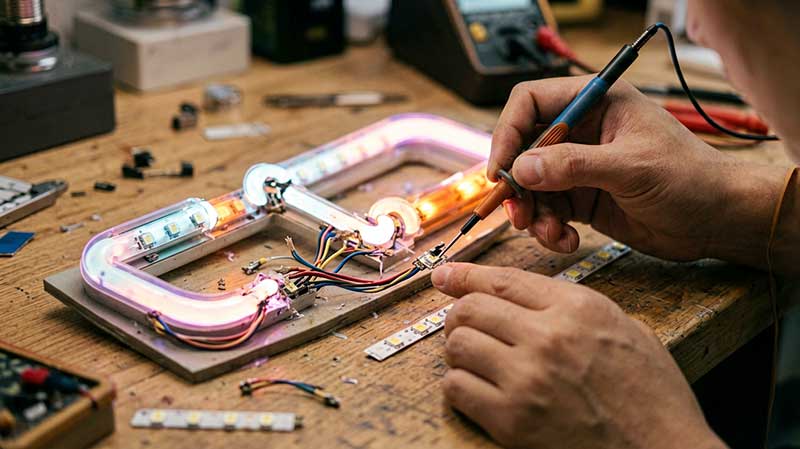
Before calling a repair shop, run through this diagnostic checklist. Most issues can be resolved in under 30 minutes with basic tools.
Not lighting at all → Check the power supply. Is the LED driver LED indicator on? Try a known-working power supply of the same voltage and amperage. If the sign lights up, your driver was the problem — replace it. If it still won’t light, check the connection between the driver and the LED strip (a loose connector is surprisingly common).
Part of the sign is dark → Check the LED strip segment. Look for a visible dark spot or damaged section. Many LED neon strips have cut marks every few inches — you can cut out a damaged segment and reconnect the remaining strip, though this shortens the sign permanently. If the dark section is at a connector point, reseating the connector may fix it.
Flickering → Power supply or voltage drop. Flickering usually means the power supply is failing or undersized. It can also indicate voltage drop if the sign is too long for the driver wattage. Check the driver specification against your sign length. If the driver is rated correctly, replace it with a higher-quality unit.
Water damage → Depends on severity. If water got inside the power supply, unplug it immediately, let it dry completely (48+ hours in a dry area), then test. If the LED strip itself got wet, the corrosion may be irreversible. Indoor-rated signs exposed to moisture typically need replacement.
How to Clean Your LED Neon Sign (Without Damaging It)
Cleaning your LED neon sign is straightforward, but using the wrong method can destroy it. Here is what to do — and what to avoid.
DO: Use a soft microfiber cloth slightly dampened with mild soap and water. Gently wipe the surface of the acrylic or silicone channel. For stubborn dust in crevices, use compressed air. Always unplug the sign before cleaning and make sure it is completely dry before plugging back in.
DON’T: Never use harsh chemicals like acetone, alcohol, bleach, or ammonia-based cleaners. These can cloud or craze the acrylic and damage the silicone casing. Never use a pressure washer — water will force its way into sealed ends and short the LED strip. Never submerge the sign in water, even if it seems fully sealed. Most LED neon signs are water-resistant, not waterproof.
For outdoor signs, cleaning every three months is sufficient. Indoor signs need cleaning only once or twice per year unless they are in a dusty environment like a kitchen or workshop.
Preventive Maintenance Checklist
A little regular maintenance goes a long way. Follow this schedule to maximize your sign’s lifespan:
Monthly (2 minutes): Inspect the sign visually while it is on. Look for any dark spots, uneven brightness, or flickering. Check that the power supply is not unusually hot to the touch. If the sign is outdoors, verify there is no visible water ingress or condensation inside the acrylic.
Quarterly (10 minutes): Clean the sign following the guidelines above. Check all connectors and cables for signs of wear, corrosion, or loose connections. For outdoor signs, inspect the mounting brackets for rust or loosening.
Yearly (30 minutes): For outdoor signs, schedule a professional inspection. A sign technician can check for internal corrosion, test the power supply under load, and verify that the sealant at connection points is still intact. Indoor signs can skip this step unless you have noticed issues.
When Is It Cheaper to Replace Than Repair?
Not every sign is worth repairing. Here is how to decide whether to fix or replace:
Signs under $300: replace. Small LED neon signs from online retailers are usually less expensive to replace than repair. A replacement power supply might be $20, but if the LED strip itself is damaged, the labor and materials to repair a budget sign often exceed the cost of buying a new one.
Large custom signs: repair is worth it. If your sign was custom-made and cost $800 or more, repairs almost always make financial sense. The power supply is a standard part that costs under $40. Even replacing a section of LED strip is usually a few hundred dollars at most — far less than a full custom replacement.
Water damage to the LED strip: likely replace. Once water has corroded the LED strip, the damage is usually too extensive for a reliable repair. The power supply may have survived (if it is in a separate enclosure), but the strip itself will continue to fail even after drying. In this case, budget for a new sign or a full strip replacement.
How to Extend Your LED Neon Sign’s Life
The average LED neon sign lasts 30,000 to 50,000 hours — that is 3 to 5 years of continuous use or 10–15 years of daily on-off cycling. You can push toward the upper end of that range with a few simple precautions.
Use a surge protector. Power surges from the grid or nearby appliances can fry an LED driver instantly. Plug your sign into a basic surge-protected power strip. This is the single most effective thing you can do.
Keep the power supply ventilated. Heat is the number one killer of LED drivers. Never coil the power supply cable tightly or hide the driver inside an unventilated enclosure. If the driver feels uncomfortably hot to the touch, move it to a cooler location or add ventilation holes.
Choose signs with replaceable power supplies. When buying a new sign, check that the power supply uses a standard barrel connector (5.5mm x 2.1mm is common) rather than being soldered or hardwired. Replaceable supplies make the most common failure point a $20 fix instead of a headache.
Turn it off occasionally. LED strips have a finite lifespan measured in hours. Turning the sign off overnight or when the store is closed extends its useful life significantly. If you want the sign on 24/7 for ambiance, at least turn it off once a week for a few hours to let the driver cool down.
Need a replacement or new sign? Browse our gallery for inspiration, check out our retail sign collection, or read our storefront sign cost guide for budgeting help.
More Storefront Sign Resources
Preventing problems starts with choosing the right sign. Read our outdoor durability guide to avoid weather-related failures, and check our buying guide for tips on vetting manufacturers. If you’re still debating DIY vs professional, see our full comparison.